
Tripio
TripioTravel & Local
4.014.00 Reviews
- Version
- 2.3.0
- Installs
- 10.00K
- Age Rating
- Everyone
Screenshots
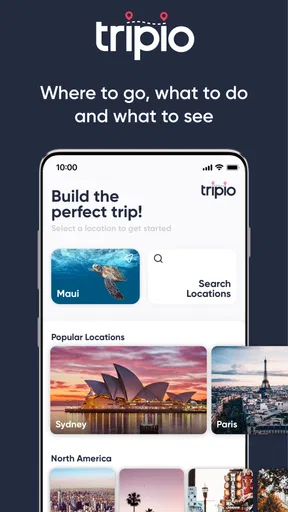

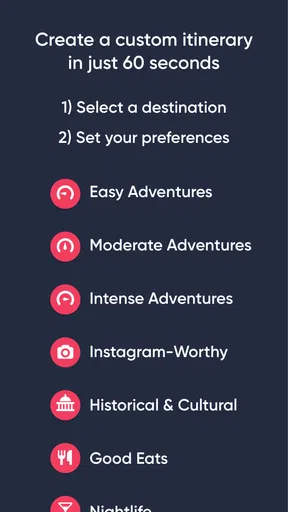
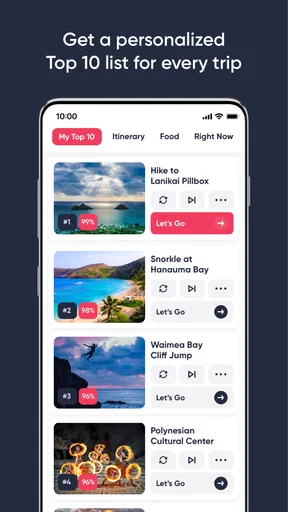
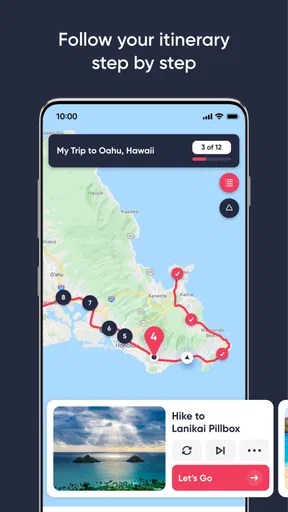
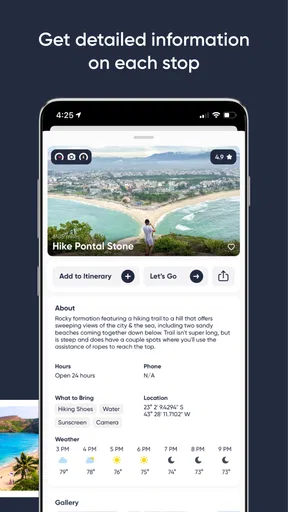
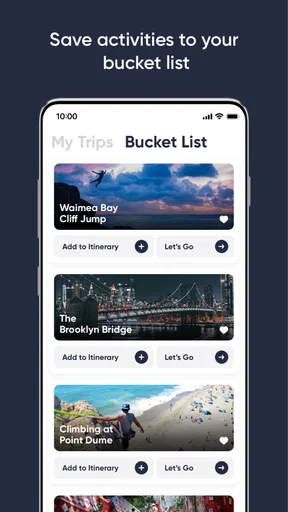
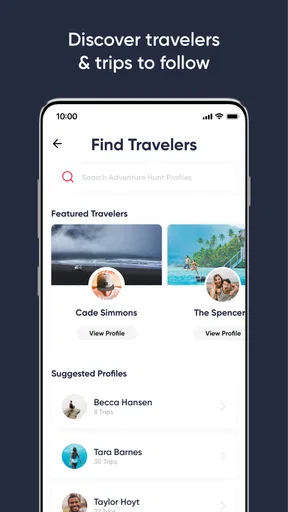
Our Review of Tripio
 Analysis by Appyee
Planning a trip can become surprisingly messy when useful information is scattered across search results, notes, maps, booking pages, and messages. I tried Tripio as a travel and local app with that problem in mind, and my first impression was that it works best as a practical starting point rather than a complete replacement for every travel service. It is free to download, aimed at everyone, and developed by Tripio. The app’s role is broad: it is designed to bring travel resources into one place so you can move from “I might go there” to a more organized plan without constantly switching between unrelated tools.
That broad purpose is both its appeal and its main challenge. Tripio is not the kind of app I would use blindly for every reservation, route, or last-minute decision. Instead, I found it more useful when I gave it a clear job: collect ideas, compare possibilities, prepare a short list, and return to the same travel information while refining a plan. If you approach it that way, its simple presentation becomes easier to appreciate.
How I use Tripio from the first idea to a workable plan
My baseline workflow starts before I have fixed every detail. I open the app when I know the destination or general area but still need to shape the trip. Rather than trying to solve transport, accommodation, food, sightseeing, and timing all at once, I use it in stages. First I look for the places and resources that match the trip. Then I narrow the list according to distance, time, and the kind of day I actually want to have.
This matters because travel planning often fails through overload. A long list of attractive places is not automatically a useful itinerary. I prefer to identify a few realistic options, then check whether they fit together geographically and practically. Tripio is more comfortable in that discovery-and-organization phase than in the role of a specialist booking platform. For a traveler who wants one focused place to begin, that distinction is important.
A realistic everyday example would be a weekend in an unfamiliar city. On a weekday evening, I might use Tripio to gather possible neighborhoods, activities, and local stops. The next day, I would remove anything that feels too far away or too ambitious. Before leaving, I would use the remaining information as a compact reference rather than reopening dozens of browser tabs. This habit reduces decision fatigue, especially when traveling with another person who has different priorities.
I also like separating “interesting” from “definitely doing.” During the first pass, I allow myself to collect possibilities without committing to them. During the second pass, I ask practical questions: Is this near the other places I want to visit? Does it suit the weather or the time available? Would I still choose it if I were tired? That second filter is where a travel resource becomes genuinely useful instead of just inspirational.
The app is especially approachable for casual travelers who do not want to build a complicated spreadsheet. It can also help someone who travels regularly but prefers a lighter planning method. I would not describe it as a substitute for a dedicated navigation app, a specialist hotel service, or an airline’s own application. Those tools are usually better when the task is a precise booking, live route adjustment, or account-based reservation management. Tripio’s value is in connecting the planning stages around those specialist tools.
What I check before relying on it during a trip
One of my first habits is to distinguish planning information from live operational information. A resource can help me decide what I want to do, but opening a separate official source is still sensible when a departure time, admission condition, cancellation rule, or temporary closure could affect the day. This is not a criticism unique to Tripio; it is a normal trade-off between a broad travel organizer and services that own the final operational details.
I also avoid building a schedule so tight that one delay ruins everything. Tripio is more useful when I leave room between activities and keep one or two alternatives nearby. That approach turns the app into a flexible decision aid. If a museum visit takes longer than expected, I can choose another nearby option instead of treating the whole itinerary as failed.
Another useful habit is to prepare while connected and keep important practical details available before leaving. I do not assume that a travel app should be my only source of information in a place with unreliable signal, limited battery, or expensive mobile data. I save the essentials in a form I can access quickly and keep booking confirmations in their original services. Tripio can support the plan, but it should not carry every critical document by itself.
Settings and choices worth checking early
Tripio does not reward random tapping as much as deliberate setup. I begin by checking the app’s available preferences and adjusting the experience to the trip I am actually planning. The useful question is not “What can I turn on?” but “What information do I want to see repeatedly?” A city break, a family outing, and a road trip produce very different shortlists, so I try to keep the working view focused rather than treating every possible resource as equally important.
Location-related choices deserve particular attention. If I am exploring near my current position, location access can make discovery more convenient. If I am planning a future destination from home, I prefer entering or browsing the destination deliberately rather than allowing the current location to dominate the experience. This simple distinction prevents a common planning mistake: collecting nearby suggestions when I meant to prepare for somewhere else.
I also review notification behavior instead of accepting every prompt automatically. Travel apps can become distracting when they interrupt planning with information that is not relevant to the current trip. I prefer alerts that help me return to an active plan, while keeping unnecessary interruptions out of the day. The exact usefulness of notifications depends on how Tripio presents them and on the kind of trip being organized, so I treat them as a personal choice rather than an essential feature.
Privacy-conscious users should take the same measured approach with permissions. I grant access only when it improves a specific task, such as finding relevant nearby resources, and I reconsider it when I am finished with that task. People who want the simplest possible setup may prefer manual browsing, while those who value location-based discovery may find the extra convenience worthwhile. Either way, making that decision consciously is better than letting setup choices disappear into the background.
There is also a practical financial point. Tripio is free to use at the download level, but it includes optional in-app purchases ranging from a few dollars to amounts in the tens of dollars per item. I would therefore explore the free experience first and decide whether any paid item solves a problem I genuinely have. I would not pay simply because I am already invested in planning a trip. A useful rule is to compare the purchase with the time it saves and with the cost of obtaining the same information elsewhere.
Faster patterns that make repeat planning easier
The biggest speed improvement comes from using a repeatable sequence. I start broad, narrow by destination and purpose, group nearby possibilities, and only then think about timing. Reversing that order creates unnecessary work because a detailed schedule may need to be rebuilt after I discover that the places are spread across the city.
For a short trip, I find it helpful to create a “must fit” group and a “nice if nearby” group. The first contains the one or two experiences that define the trip. The second gives me flexible choices for gaps in the day. This is a small but powerful distinction: it protects the central plan while allowing spontaneous decisions. It also makes Tripio more useful when the weather changes or when energy levels are lower than expected.
Another efficient pattern is to plan by area instead of by category. Rather than collecting every restaurant, attraction, and local stop separately, I look at what can sensibly be combined in one part of town. This reduces travel time and gives the day a natural rhythm. It is one of the less obvious benefits of using a broad travel resource: the app can help me think in terms of a place and a day, not just isolated recommendations.
I also keep a short “decision note” outside the app when traveling with others. It might contain the group’s food preferences, walking tolerance, opening-time concerns, or a backup for rain. This is not a Tripio feature; it is a workflow that prevents the app from becoming a dumping ground for every thought. The app remains focused on travel resources, while the note captures the rules used to choose between them.
For repeat users, consistency matters more than speed during the first session. I use the same order each time and review the plan at a calm moment, rather than attempting to organize everything while standing in a station or airport. Once the habit is established, the process feels faster because I am making fewer decisions about how to plan and more decisions about the trip itself.
Where Tripio reaches its limits
The app’s wide travel focus means I would not expect the depth of a specialist service in every area. If I need a confirmed reservation, a live transit disruption, detailed turn-by-turn guidance, or a formal support channel for a booking, I would go directly to the relevant provider. Tripio can help me decide what belongs in the plan, but the final authority should usually be the official service responsible for that detail.
I also think users should be realistic about the difference between discovery and verification. A suggestion may look ideal during planning and still require a final check before I travel. Conditions change, and a broad resource should not be treated as a guarantee that every practical detail remains current. The best workflow is to use Tripio for selection and organization, then verify anything that could cost time or money.
People who want a fully automated itinerary may find the experience less satisfying. I prefer having control over the choices, but someone looking for a system to schedule every hour with minimal input may be better served by a dedicated itinerary planner. Likewise, travelers who already have a trusted collection of map lists, booking apps, and notes may not gain enough from adding another layer.
The purchase model is another point to consider. Although the app is free, optional items can become expensive if someone buys them impulsively across several trips. I would treat paid content as a deliberate upgrade, not as part of the basic expectation of a free download. Checking the value of each item against the specific destination and trip length is the sensible approach.
Device compatibility is reasonably accessible for older Android users because the app supports Android versions from 6.0 onward. Its current version is 2.3.0, so I would still keep it updated when possible, especially before a trip. Updates can matter for stability and compatibility, but I would not postpone essential travel preparation until the last minute. Installing, opening, and testing the app at home is a better habit than discovering a problem after arrival.
Who gets the most from this travel resource?
I would recommend Tripio to travelers who want a central planning companion without turning preparation into a project. It suits people who enjoy comparing options, building a flexible day, and returning to a shortlist as plans change. It is also a good fit for someone visiting a new area and needing a structured way to begin exploring local possibilities.
Families and small groups may appreciate the planning workflow because it makes discussion easier. Instead of sending a stream of separate links, one person can gather options and then reduce them to choices that fit the group’s time and interests. The app does not remove disagreement, of course, but it gives the conversation a clearer starting point.
I would be more cautious recommending it to business travelers who need exact schedules, travelers managing complex reservations, or people who depend heavily on real-time navigation. Those users may prefer direct provider apps and established mapping tools. Tripio can still contribute to the research stage, but it should not be the only tool in a high-pressure itinerary.
The app has reached over ten thousand installs and holds an average rating of four out of five from roughly fifty ratings, with around a dozen written reviews. That is enough to show that it has found an audience, but not enough for me to treat the rating as a complete picture of every travel situation. I pay more attention to whether its workflow matches my needs than to the number alone.
My verdict after building a repeatable habit
Tripio works best when I use it with intention. The winning combination is simple: choose the destination deliberately, keep the working list focused, group options by area, leave room for changes, and verify critical details through the responsible official source. Those habits make the app feel more capable than a quick glance at its broad travel purpose might suggest.
I like that it lowers the barrier to organized travel planning without demanding a complicated system. I also appreciate that it can sit alongside maps, booking services, and personal notes instead of forcing me to abandon them. Its limitations are real, particularly for live operational information and highly automated itineraries, but they are manageable when I give the app the right role.
Tripio was released on June 7, 2022, and its current version is 2.3.0. For me, the important question is not whether it replaces every travel app; it does not. The better question is whether it helps turn scattered ideas into a usable, flexible plan. In that role, Tripio is a worthwhile free starting point for travelers who prefer practical organization over fully automated planning.
If I were recommending it to a friend, I would say: try the free experience before committing to any optional purchase, prepare your shortlist before travel, and keep specialist apps available for bookings and live changes. With that approach, Tripio becomes a helpful travel companion rather than another app competing for attention.
Verdict
Strengths of Tripio
- Simple interface makes trip planning quick and approachable.
- Useful for discovering destinations and activities in one place.
- Helps organize travel ideas without needing several separate apps.
- Convenient for comparing options while building an itinerary.
- Suitable for both spontaneous trips and more detailed planning.
Limitations of Tripio
- Some listings may lack detailed descriptions or recent updates.
- Availability of destinations and features can vary by region.
- May require an internet connection for reliable access to content.
- Not every recommendation will match individual travel preferences.
- Advanced planning tools may feel limited for complex itineraries.
Similar Picks in This Category
View All
Google Maps
Google LLC3.4

Google Maps Go
Google LLC4.1

Booking.com: Hotels & Travel
Booking.com Hotels & Vacation Rentals4.8

Google Earth
Google LLC3.8

Skyscanner Flights Hotels Cars
Skyscanner Ltd4.8

trivago: Compare hotel prices
trivago N.V.4.4
Frequently Asked Questions
What is Tripio and what can I use it for?
Tripio is a travel-focused app designed to help users organize and improve their trips from one place. Depending on the available features and region, it may help you discover destinations, plan activities, manage travel details, and find useful recommendations. It is best suited to travelers who want a more convenient way to research and arrange their itinerary instead of relying on several separate travel tools.
Is Tripio free to download and use?
Tripio can generally be downloaded without an upfront charge, but some features may depend on the app’s current business model, location, or account type. Certain services, bookings, premium tools, or partner offers could involve additional costs. Before confirming any reservation or purchase, review the displayed price, taxes, cancellation terms, and whether the charge comes from Tripio or an external travel provider.
Does Tripio require an account or an internet connection?
Some Tripio functions may be available without registering, such as browsing selected information, but creating an account is commonly necessary for saving plans, synchronizing data, receiving personalized suggestions, or managing bookings. An internet connection is normally required to search for live travel information and update content. Offline access, if offered, may be limited to previously saved details.
Is Tripio useful for planning complete vacations or only individual activities?
Tripio’s usefulness depends on the features available in the version you install, but it is intended to support more than simple destination browsing. You may be able to research places, discover experiences, and organize parts of a journey in one app. However, travelers should check whether flights, hotels, transportation, payments, and reservations are handled directly or through separate third-party services.
What should I check before downloading Tripio?
Before installing Tripio, check its latest store description, supported countries, device requirements, privacy policy, and recent user reviews. Travel apps can offer different content and services depending on location, and some may request access to location, notifications, or personal information. Also verify update history, customer-support options, cancellation policies, and whether the app meets your specific planning or booking needs.
